
In iTraceiT, personal account settings are managed separately from domain settings. Your profile information, security preferences, and personal options are accessed from the Access Hub, before entering any domain.
This design ensures that user-level settings remain independent from organizational configuration and domain-specific workflows.
Where to Access Your Profile Menu
When you are on the Access Hub, your user card appears on the left side of the screen. This card displays your name and profile icon.
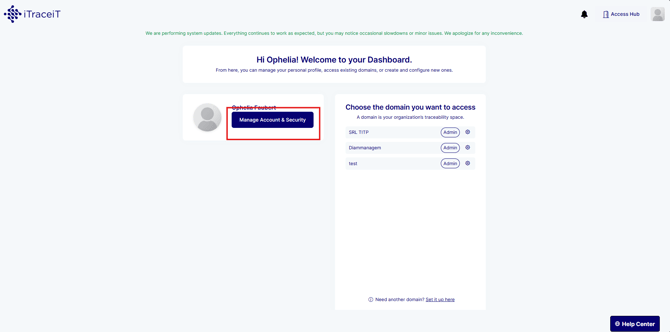
From this user card, you can access your personal account settings, including profile information and account security. This is the main entry point for managing your user profile in iTraceiT.
These settings are available before entering a domain and apply across all domains you have access to.
Manage Account and Security
By selecting the option to manage your account and security from the user card, you are taken to your personal account settings.
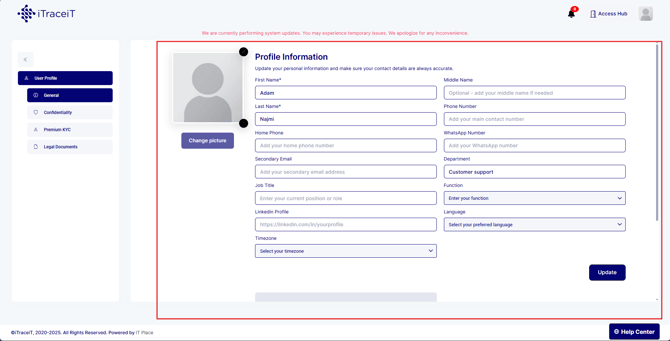
In this area, you can:
-
Manage contact details and preferences
-
Configure security options related to your account
All profile information is managed within the Account & Security section of the platform.
Profile Settings Are User-Specific
All changes made in your profile settings apply only to your user account. They do not affect:
-
Domain configuration
-
Other users’ settings
-
Organizational or billing information
This separation ensures that users can safely update their personal details without impacting the wider organization.
Relation to Domain Access
While your profile settings are accessed from the Access Hub, domain-related actions such as managing users, company information, or subscriptions are handled separately within domain settings.
To configure your domain (s) and their access, you can refer to this article: How to Configure Domain Settings
The Profile Menu in iTraceiT provides a clear and dedicated space to manage your personal account settings. By accessing it directly from the Access Hub user card, you can update your profile and security preferences at any time, independently of any domain. This structure keeps personal settings simple, secure, and clearly separated from organizational configuration.