
This article explains how to access your profile settings and update your personal details, contact information, and preferences. Updating your profile takes only a few steps and can be done at any time through the Access Hub.
All profile information is managed within the Account & Security section of the platform. You can modify your name, contact details, job function, preferred language and more.
Follow the steps below to update your profile.
-
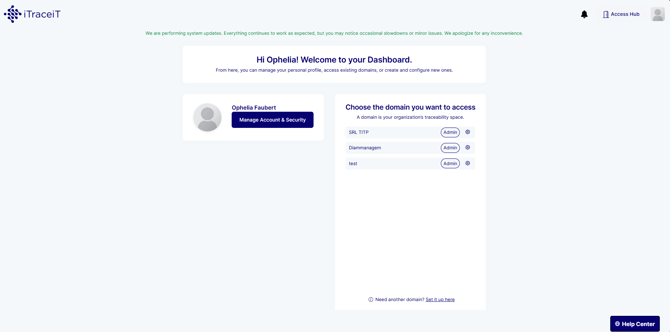
Step 1: Log in to iTraceiT, and access the dashboard.
-
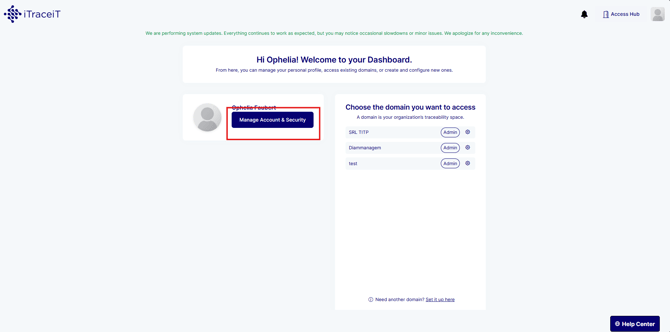
Step 2: Click Manage Account & Security. This will take you to your personal account settings.
-
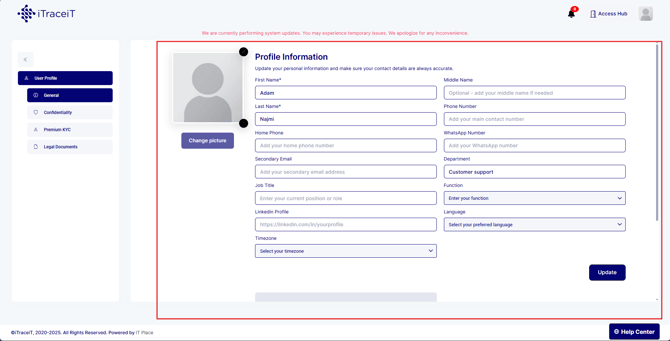
Step 3: From the menu on the left, click General under User Profile.

-
Step 4: You can now edit the following fields:
- First Name and Last Name
- Phone Number and WhatsApp Number
- Secondary email address
- Job Title and Department
- LinkedIn profile
- Language and Timezone
Make any required changes.
-
Step 5: Once all updates are made, click on the button Update at the bottom of the form. Your profile information will be saved immediately.
Keeping your profile information accurate ensures smooth communication and helps maintain account security. You can revisit this section anytime to make updates as your details or preferences change.