
If you receive QR codes from a partner or supplier, iTraceiT allows you to easily import, verify and link them into your own system so you can continue the traceability chain without interruptions. This ensures that the information collected by previous actors remains intact while you add your own verified data to the same product journey.
iTraceiT’s design makes it possible for every participant in a supply chain to join an existing traceability process. Whether you are a manufacturer, trader or retailer, you can import received QR codes, check their details and attach new information such as transformation steps, transport data or ownership changes.
Understanding the Purpose of Imported QR codes
When you receive QR codes, they already contain verified data published by another actor on the blockchain. Importing them into your iTraceiT workspace allows you to create a secure and traceable link between your operation and the previous one.
Instead of creating a new digital identity for the same product, the system connects your data to the existing record, ensuring that transparency and authenticity remain continuous across all transactions.
How to Import and verify a Received QR code
The import process in iTraceiT is simple and quick.
- Step 1: Log in to iTraceiT and go to the Homepage.
- Step 2: Paste the QR ID received into the search bar.
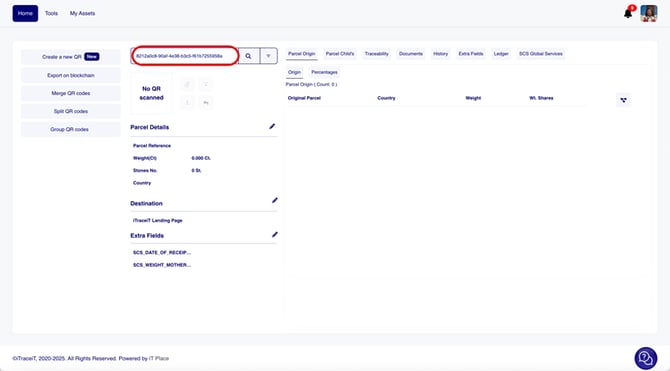
- Step 3: Click the Search icon to retrieve the parcel.
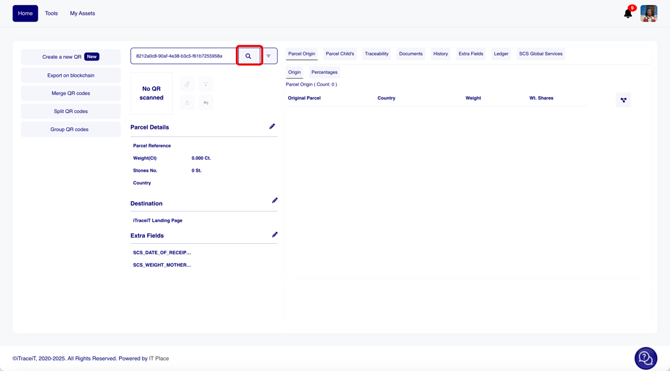
- Step 4: Review the parcel details shown in the pop-up window, including:
-
Internal Reference
-
Weight (ct)
-
Number of Stones
-
Origin / Producer Country
- Certificates (if applicable)
-
- Step 5: If all information is correct, click Proceed to confirm the import.
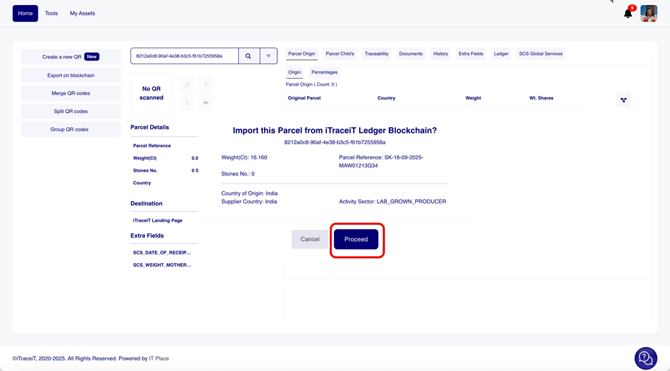
Before you confirm the import, it is important to review the key details contained in the QR code. Check the parcel reference, origin, weight, etc. If the data appears correct as expected, you can proceed with confidence.
If you notice discrepancies or incomplete information, contact the sender before confirming the import.
Maintaining verified and accurate data ensures that the traceability chain remains credible and compliant.
When you proceed with the import, the system will automatically create a new QR code in your workspace that is securely linked to the original one from the sender. This connection ensures that your imported parcel inherits the traceability record while keeping your own actions distinct.
Linking and Continuing the Chain
Once imported, the QR code becomes part of your own database. You can now add your own data, such as new processing information, updated weights or quality checks. You can also attach new documents, images or certificates to reflect your stage of the process.
The system automatically keeps the link between your new QR code and the previous one, allowing the full product history to remain visible from origin to end consumer. This linking process ensures that transparency is preserved while preventing duplication or data loss.
Publishing and Sharing the Updated Record
After updating your information, you can publish your data to the blockchain. This action records your contribution permanently and confirms your participation in the traceability chain. The published record will include both your data and the inherited trace from the previous actor.
You can then share your updated QR codes with the next participant so that they can continue the process in the same seamless way.
By importing, verifying and linking received QR codes, you keep the chain of trust unbroken. iTraceiT makes it effortless for every actor to contribute to transparent, verified and continuous traceability across the entire supply network.