
Important: This article applies only to clients under SCS Global Services. If you are not an SCS certified Producer, Handler, or Jeweler, this content does not apply to your workflow.
Melee parcels follow a specific traceability workflow that must be respected across both the Growing and Manufacturing domains.
Unlike other processes, Melee parcels require SCS Validation at both stages and rely on dedicated Excel templates, especially during the Manufacturing phase.
Growing Stage: Creating and Validating Melee Parcels
The process begins in the Growing domain, where the initial parcels are created.
At this stage, you must:
- Create your rough parcels using the correct Excel template "import_rough_en"
- Ensure all mandatory fields are completed
- Request SCS Validation
- Wait until the parcels are validated
- Export the validated parcels to the blockchain
For detailed instructions, refer to:
SCS Producers – How to Create QR Codes
SCS Producers – Mandatory Fields for Growing Stage
SCS Producers – How to Request Validation
SCS Producers – How to Export QR Codes on the Blockchain
Once exported, these parcels become the Mother Stones for the next stage.
Manufacturing Stage: Processing Melee Parcels
After completing the Growing stage, you must continue the workflow in the Manufacturing domain.
-
Step 1: Import the Mother Stones from the Growing domain using the Group ID/QR ID
-
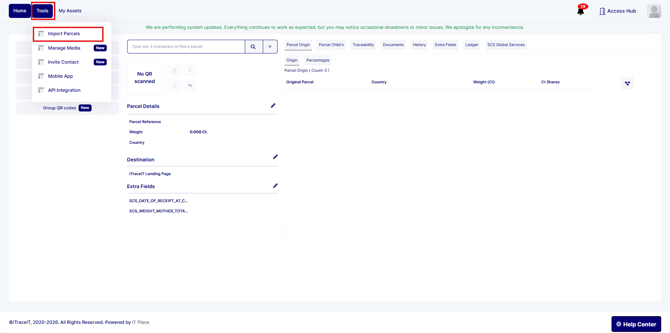
Step 2: Go to Tools → Import Parcels
-
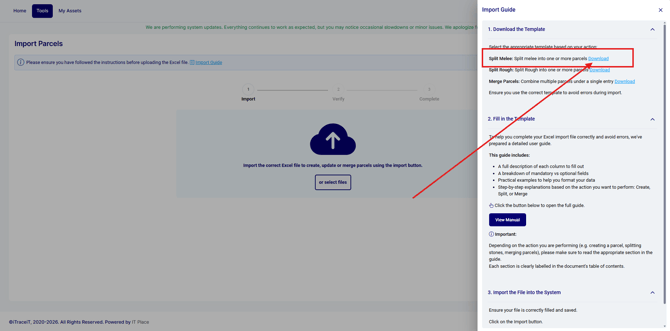
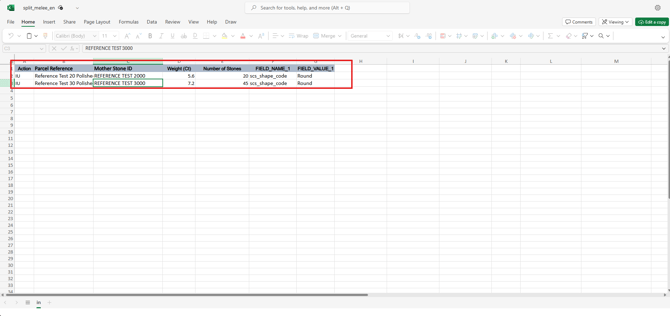
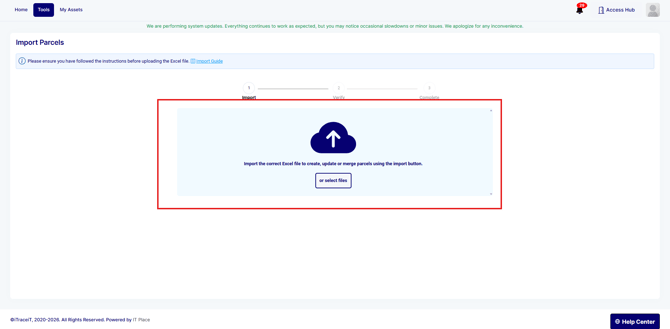
Step 3: Download the excel split melee file, then fill in it and re upload it
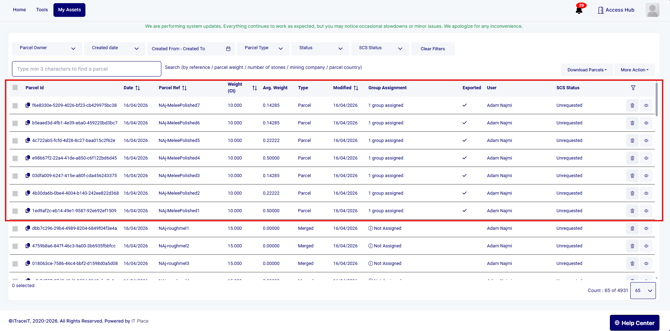
Step 4: Go to My Assets → Single Items
-
Step 5: Verify that all parcels are correctly created
-
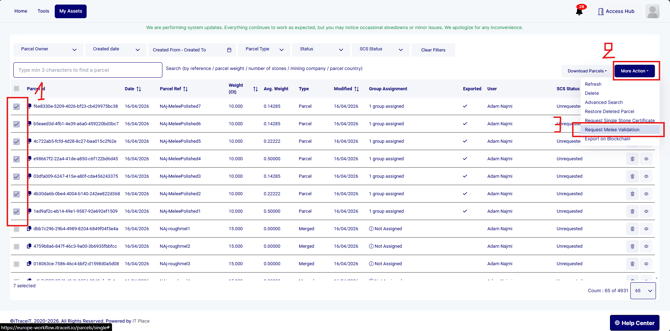
Step 6: Select the parcels and request SCS Validation
-
Step 7: Wait for validation to be confirmed
Understanding the Split Melee Template
The Split Melee template is mandatory at the Manufacturing stage.
It is specifically designed for batch processing and includes required fields such as:
- Parcel reference
- Mother Parcel ID
- Weight
- Number of Stones
- Shape
The Number of Stones field is critical. It defines how many stones are included in each parcel and must be accurate.
If this field is missing or incorrect:
- Validation will fail
- Parcels will not be processed
Key Validation Rules for Melee
To ensure successful validation:
- Parcels must originate from the Growing domain
- The Group ID import must be completed before splitting
- All mandatory fields must be filled in the Split Melee file
- Data must remain consistent across both domains
- Validation must be completed before moving forward
Best Practices
- Always verify your Excel file before uploading
- Double-check the Number of Stones for each parcel
- Test with a small batch if needed
- Confirm parcel creation in My Assets → Single Items before requesting validation
The Melee workflow requires careful execution across both the Growing and Manufacturing domains. By following the correct sequence and using the proper templates, you ensure that your parcels are validated successfully and remain fully compliant with SCS requirements.