
When the platform does not load properly or remains stuck, the issue is usually local to your browser. Cached data can become outdated or corrupted, which may prevent iTraceiT from loading correctly.
Clearing your browser cache and local storage forces the platform to reload fresh data and usually resolves the issue immediately.
This article explains the exact steps to follow.
When to Clear Your Browser Cache
You should clear your cache if you experience:
-
Endless buffering or loading screens
-
Blank or partially loaded pages
-
Features not responding
-
Unexpected display issues
If other users can access the platform normally, the issue is likely coming from your browser.
How to Clear Cache Using Developer Tools (Recommended Method)
Follow these steps directly on the iTraceiT page:
-
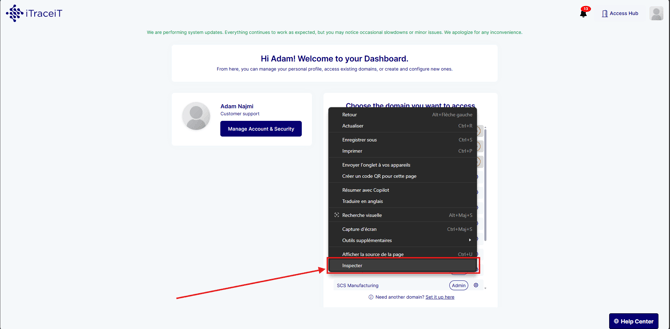
Step 1: Right click anywhere on the page.
-
Step 2: Click on Inspect.
-
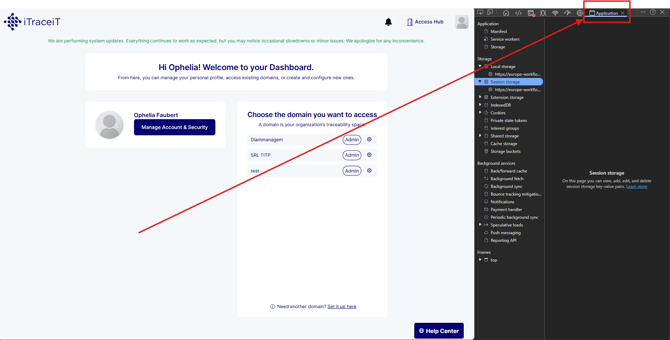
Step 3: In the panel that opens, click on the Application tab.
-
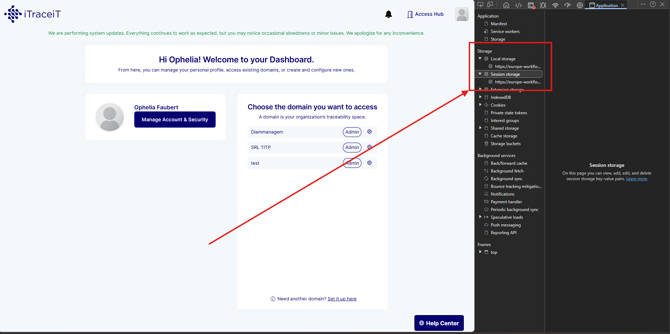
Step 4: In the left menu, go to Storage.
-
Step 5: Right click to manually clear:
-
Local Storage
-
Session Storage
-
Make sure the data related to iTraceiT is cleared.
-
Step 6: Refresh the page.
This will remove all cached data and reload the platform properly.
Video Tutorial
For a step-by-step visual guide, watch the following tutorial: How to clear the cache
Additional Checks
If the issue persists after clearing the cache:
-
Try using a different browser
-
Open iTraceiT in a private or incognito window
-
Disable browser extensions
-
Check your internet connection
Most loading and buffering issues are caused by corrupted local browser data. Clearing the cache, local storage, and session storage is the fastest way to resolve these issues and restore normal platform behavior.
If the issue continues after these steps, you can contact support for further assistance.