
Only administrators can acces the domain settings.
Keeping your billing information correct is important for subscription continuity and for ensuring that your organization’s accounting receives all required documents without interruption.
This article explains how to access your company billing details, update them and make sure all information remains valid for future invoices.
-
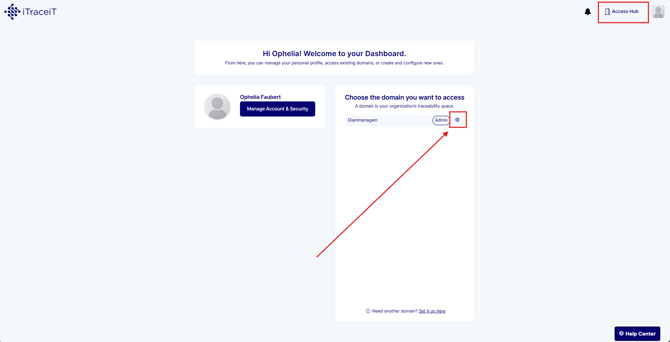
Step 1: From your dashboard, click the gear icon next to your domain name to access the settings.
-
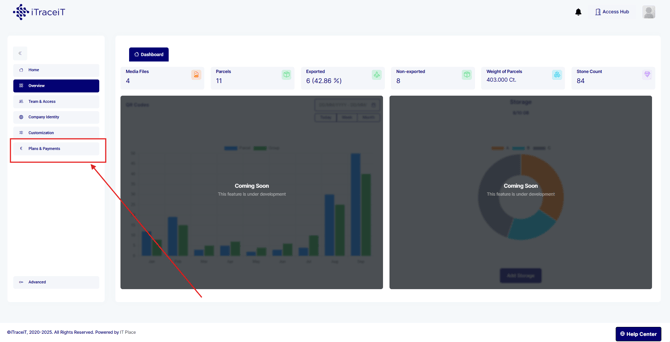
Step 2: In the left-side navigation menu, select Plans and Payments. This section groups all subscription and billing-related information.
-
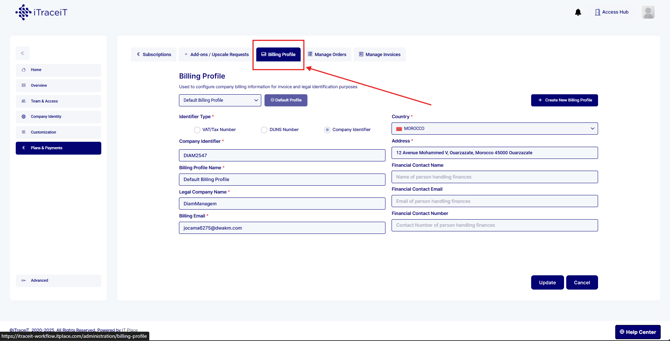
Step 3: Inside Plans and Payments, click Billing Profile. Here you will find your company’s billing address, VAT number and email for invoice reception.
-
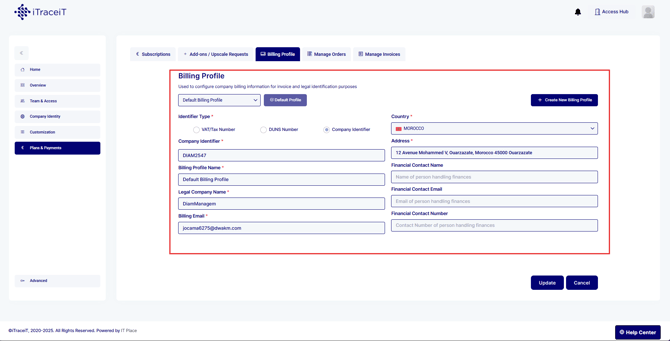
Step 4: You can either create a new billing profile or you can update the existing one:
- Company billing name
- Billing address
- VAT or tax identification number
- Billing email address
Make sure all fields are accurate before saving.
-
Step 5: After updating your details, click Update to confirm.
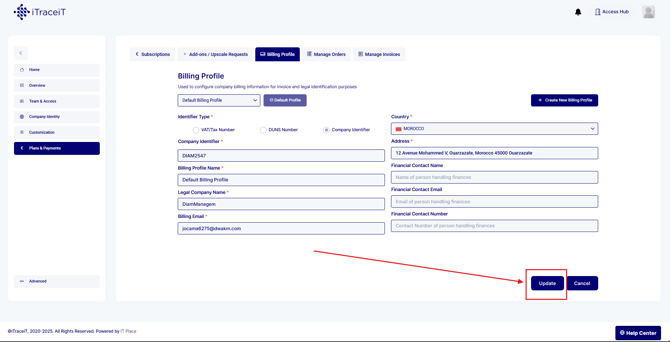
Your billing information will be applied to all future invoices.
Keeping your billing information updated ensures smooth subscription management and guarantees that all invoices are sent to the correct address. Domain administrators can revisit the Billing Profile at any time to make changes or review financial documents.