General iTraceiT inquiries and more information: support@itraceit.io
Webservices test page: http://europe-ws.itraceit.io/itraceit_core?test
or
You can use Postman to test Webservices
Description in JSON: https://europe-ws.itraceit.io/itraceit_core?description
What you need first:
Application key
Public key (for decryption/encryption)
Credentials: Please contact the iTraceiT support team to get your credentials
Notes
- The results of the web services calls are in JSON.
- You can check if the process was done properly by reading the "status" JSON field.
- If "ok", then it was processed.
- if "nok" -> something went wrong, the error is described in the "error" JSON field.
- We use this for all the web servers mentioned in this documentation
- →http://europe-ws.itraceit.io/itraceit_core
Step 1 - Get Your Integration Key
- Connect to the iTraceiT Workflow with your credentials: https://europe-workflow.itraceit.io/sign-in
- In the menu, go to Tools → API Integration, then click the "Get your integration key" button under your name.
- This will give you a one-time usage serial key.
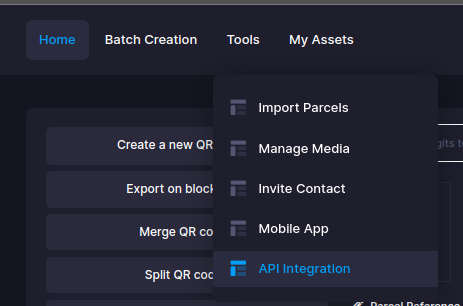
 Get API Integration Key
Note: Only authorized domains/users can generate the key. You have to ask us to activate a new domain/user when you need it.
Step 2 - Get a Mobile Token
- Call the following REST web service: /auth/v1/get_mobile_token_content/{sData}
sData = Your serial key
- This can be done via the postman or programmatically
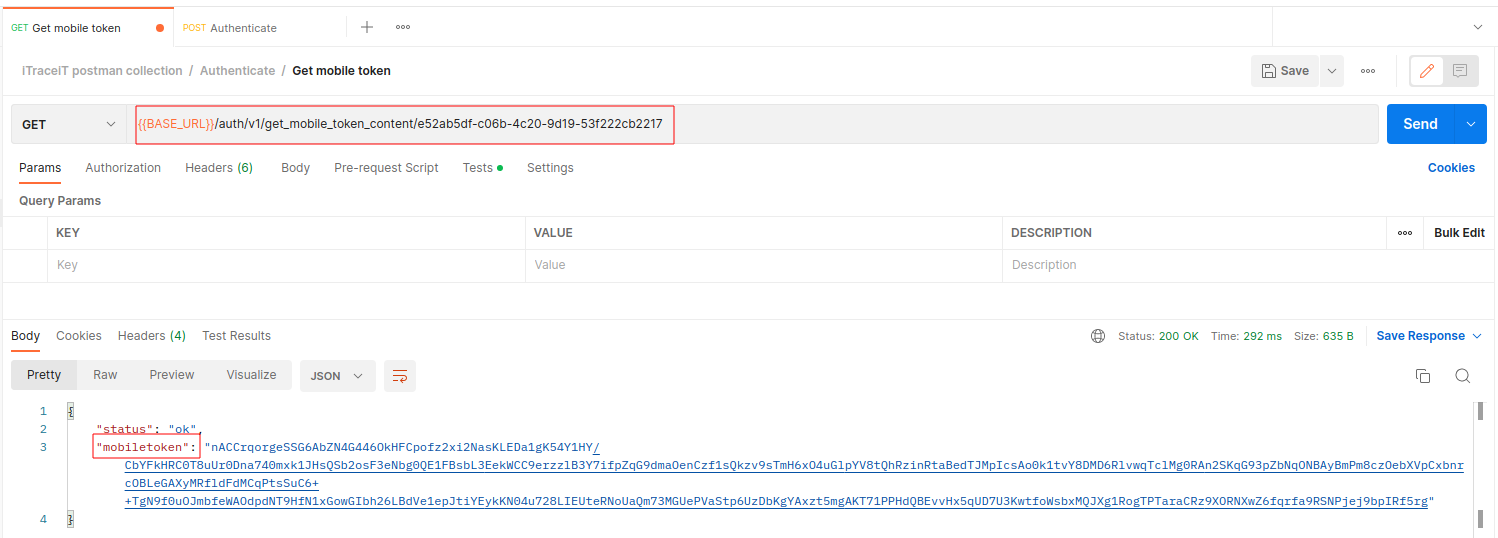 Get Mobile Token
- You will receive a "mobiletoken" that you have to decrypt.
Step 3 - Decrypt Mobile Token
- Decrypt the mobiletoken using the following algorithm.
bufCryptedResult (Buffer) = <string to decrypt>;
bufKeySHA3
(Buffer)

// 1 - Hash the password
bufKeySHA3
= HashString(HA_SHA3_256, iTraceiT_PublicKey)

// 2 - Decode the string to decrypt in BASE 64
bufCryptedResult = decode64 (bufCryptedResult) with NO CR;

// 3 - Decrypt
bufCryptedResult = Decrypt with algorithm <crypt AES 256> with following parameters :
bufKeySHA3, cryptCBC,cryptPaddingPKCSSample PHP code for Decryption
<?php

function decryptMobileTokenData($mobileToken){


        $public_key = "kokopdDE*-_223TgEZ!++*"; //fixed, given by email from iTraceIT

        $encrypt_method = "AES-256-CBC";
        $pub_key = hash('sha3-256', $public_key, true); //Hashing the key with SHA3-256

        $iv_length = openssl_cipher_iv_length($encrypt_method);
        $iv = openssl_random_pseudo_bytes($iv_length);

        $output = openssl_decrypt(base64_decode($mobileToken), $encrypt_method, $pub_key, OPENSSL_PKCS1_PADDING, $iv); //decryption done by here

        //Check the start of curly braces to identify correct response received
        if(strpos($output,'{ ')){
            //Then explode it by curly brace and get the second part of it if it is exit.
            $ex_resp = explode('{ ', $output);
            $output = $ex_resp[1] ?? $ex_resp[0];
        }
        //Concat the Start of curly brace to make proper json format array
        $output = '{'.$output;

        return $output; //Return the output

}Sample JavaScript code for Decryption
//The public_key is kokopdDE*-_223TgEZ!++*
//You have to hash this public key with sha3-256
//Hashed PUBLIC_KEY = e539e8ed062736dc9a66a9a8081e007f1cf1c5d31e5c1487b6a7378d8af72451
var publicKey = CryptoJS.enc.Hex.parse(PUBLIC_KEY);

var mobileToken = responce.mobiletoken;

enbuffer = CryptoJS.enc.Base64.parse(mobileToken);

var ivBuffer = enbuffer.clone(enbuffer);
var dataBuffer = enbuffer.clone(enbuffer);

ivBuffer.words = enbuffer.words.slice(0,4);
ivBuffer.sigBytes = 16;

dataBuffer.words = enbuffer.words.slice(4);
dataBuffer.sigBytes = enbuffer.sigBytes - 16;
dataBuffer = CryptoJS.enc.Base64.stringify(dataBuffer);

var responceData = CryptoJS.AES.decrypt(dataBuffer, publicKey, {'mode': CryptoJS.mode.CBC, 'iv': ivBuffer, 'padding': CryptoJS.pad.Pkcs7});
responceData = responceData.toString(CryptoJS.enc.Utf8);
responceData = JSON.parse(responceData);
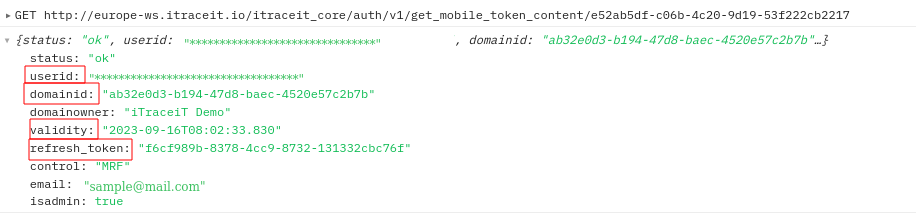 Decrypted Mobilr Token
- The mobiletoken you have is a Refresh Token.
Step 4 - Authenticate
- The Refresh Token you get in step 3, is a JSON containing
- userid (the id of the user that is responsible to give you access to iTraceiT)
- domainid (the domain data belonging to an iTraceiT member)
- domain owner (name of the iTraceiT license owner)
- refresh token (see below)
- email - email of the user
- is admin - if the user has some admin rights to the target domain
- The refresh token will be used with the Authenticate function to retrieve an access token.
- Access token can be use as Bearer for every request.
- This access token will be sent aside with a new refresh token that will be used for the next Authenticate.
- Each refresh token can only be used once.
- The access token contains information that identifies the domain you are working on with the user info.
- During your session, you can use the same access token.
- When you disconnect from your app and re-connect, simply use the latest refresh token you received in
the response of authenticate request to receive a new pair of (access_token, refresh_token).
- Call the following REST web service to Authenticate: /auth/v1/authenticate
 Request Body
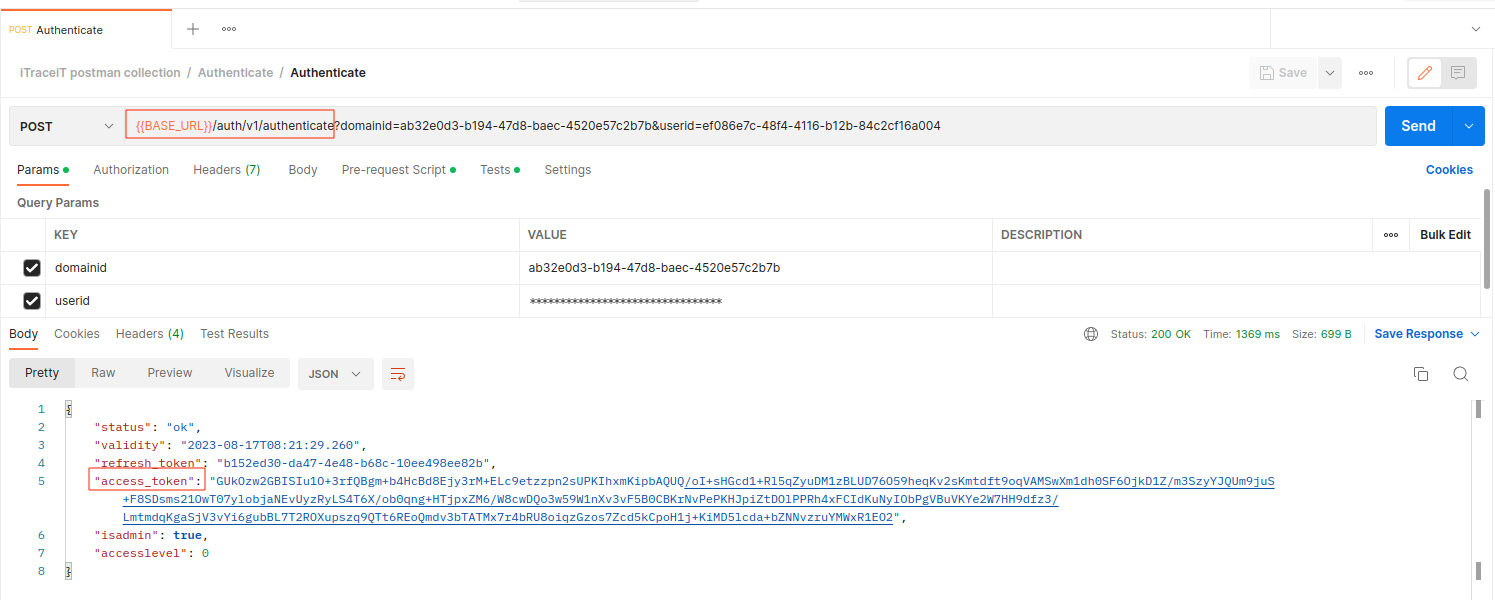 Authenticate
More info about Authenticate request
Note: You need to encrypt all the POST requests before you call the relevant web service.
Sample PHP code for Encryption
<?php

/**
 * Here I wrote a common function for encrypt the data so we can use it again
 * $data_to_encrypt : json encoded string
 */
function encryptDataToSend($data_to_encrypt){


    $encrypt_method = "AES-256-CBC";

    $public_key = "kokopdDE*-_223TgEZ!++*"; //fixed, given by email from iTraceIT

    $encrypted_pub_key = hash('sha3-256', $public_key,true); //Hashing the key with SHA3-256

    $iv_length = openssl_cipher_iv_length($encrypt_method);
    $iv = openssl_random_pseudo_bytes($iv_length);

    $encrypted_data = openssl_encrypt($data_to_encrypt, $encrypt_method, $encrypted_pub_key, OPENSSL_PKCS1_PADDING, $iv); //Encrypt with AES-256-CBC
    $encrypted_data_base64 = base64_encode($iv.$encrypted_data); //Encoding with base64 encode


    return $encrypted_data_base64; //Return the output

}Sample JavaScript code for Encryption
//Request data for Authentication function
var reqData = {
    "applicationid":'APPLICATIN_ID',
    "domainid":'YOUR_DOMAIN_ID',
    "refresh_token": "REFRESH_TOKEN",
    "userid":'YOUR_USER_ID'
};

reqData = JSON.stringify(reqData);

//Here we are using cryptojs library

 //The public_key is kokopdDE*-_223TgEZ!++*
 //You have to hash this public key with sha3-256
 //Hashed PUBLIC_KEY = e539e8ed062736dc9a66a9a8081e007f1cf1c5d31e5c1487b6a7378d8af72451

var hashKey = CryptoJS.enc.Hex.parse(PUBLIC_KEY);
var iv = CryptoJS.lib.WordArray.random(16);
var encrypted = CryptoJS.AES.encrypt(reqData, hashKey, {'mode': CryptoJS.mode.CBC, 'iv': iv, 'padding': CryptoJS.pad.Pkcs7});
var merge  = iv.concat(encrypted.ciphertext);

var encryptedString = CryptoJS.enc.Base64.stringify(merge);Step 5 - Call Web Services
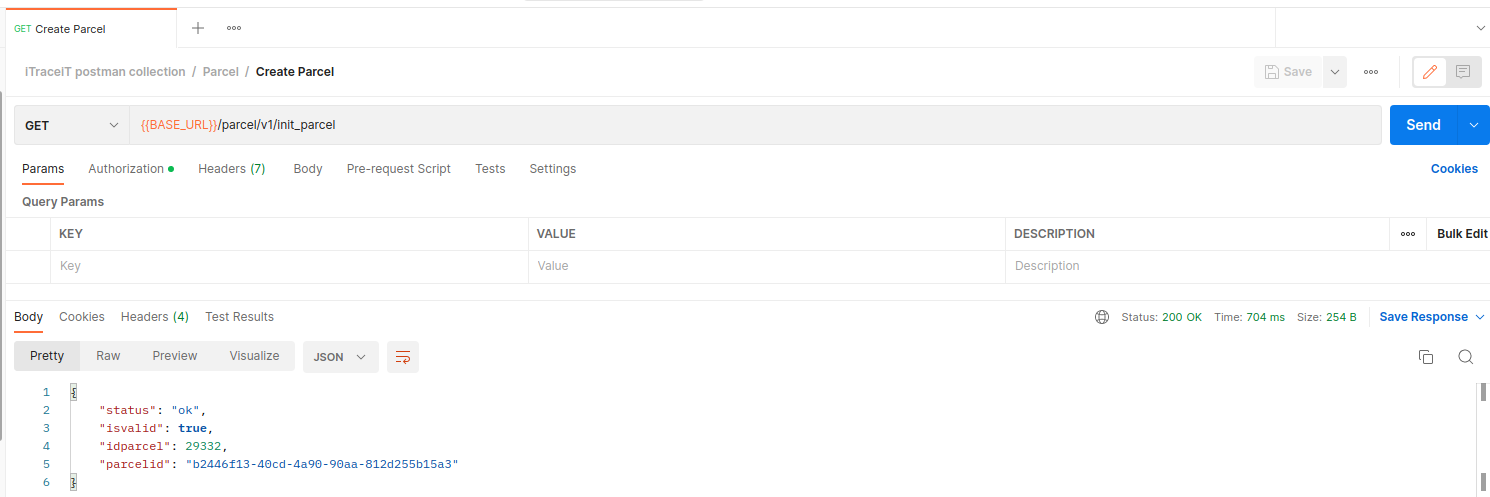
- Do a call to a web service. For example 1(GET), we will here do a call to create a new parcel:
- We add the Authorization parameter in the HTTP Header: Bearer <Access_Token>
- Then you receive a JSON with the following information:
- parcelid: the token for the new QRCode/Parcel
- isvalid: if <true> the parcel is ready to be used
- For example 2 (POST), we will here do a call to update a parcel:
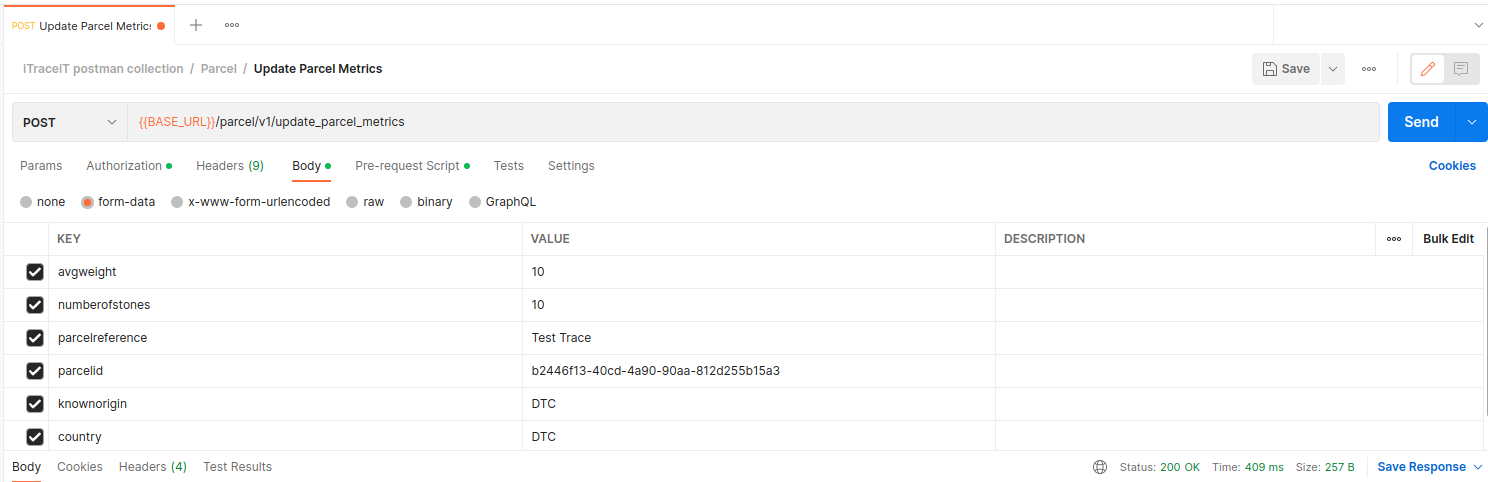
More info about parcel requests
Step 6 - Get a Refresh Token
- Call the following REST web service to get a new refresh token:
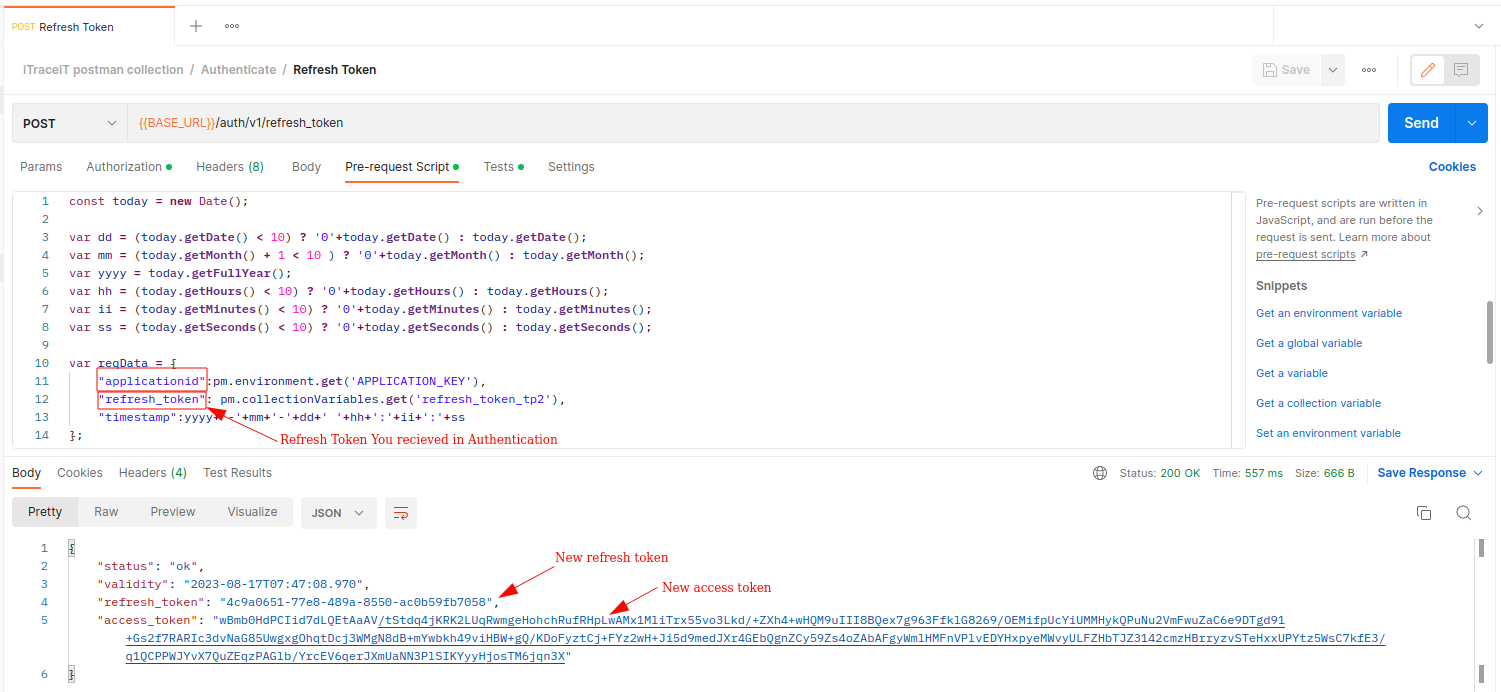
- You can get a new access token before your access token expires.