
Only administrators can acces the domain settings.
Domain administrators can download invoices directly from the billing section at any time.
This article explains where to find your invoices and how to download them.
Having access to your invoices ensures transparency and helps your finance team stay up to date.
-
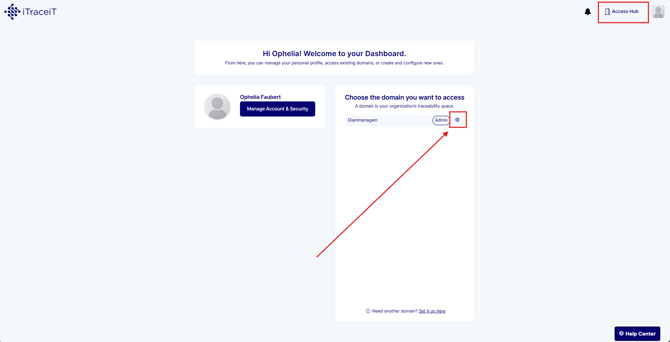
Step 1: From your domain dashboard, click the gear icon next to your domain name to access the settings.
-
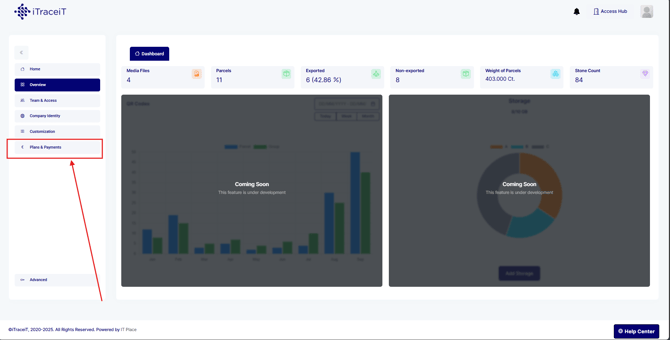
Step 2: In the left-side menu, select Plans and Payments. This section contains all subscription, billing and invoice-related information.
-
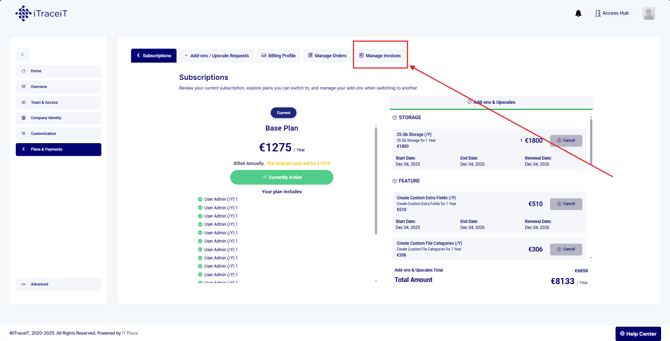
Step 3: Click Manage Invoices to view the list of all invoices issued for your domain. Each invoice is displayed with its date, reference number and status.
-
Step 4: Locate the invoice you want to download. Click on the corresponding PDF icon to start the download.

-
Step 5: The invoice is now downloaded to your computer for accounting or record keeping purposes.
Downloading invoices in iTraceiT is quick and straightforward. Domain administrators can access past and current invoices at any time from the Plans and Payments section, ensuring accurate financial tracking and easy document retrieval.