
In today’s ethical and transparent marketplace, providing full traceability is a growing priority for jewelers. iTraceiT makes it possible to link your product to upstream information whether your supplier is already using the platform or not.
This article outlines two common scenarios and explains how to include upstream traceability data correctly, while also clarifying why, in some cases, this information isn't reflected in the traceability journey report of the QR code.
Why Upstream Traceability Matters
-
Customer Trust: Consumers increasingly demand proof of responsible sourcing.
-
Brand Value: Demonstrating full traceability supports ethical and luxury positioning.
-
Compliance: In some markets, traceability is not just an asset; it’s becoming a requirement.
By connecting upstream data, you ensure your QR code carries a full history, from mine to retail.
Scenario 1: Your Supplier is an iTraceiT Member
If your supplier already uses iTraceiT, the process is straightforward.
-
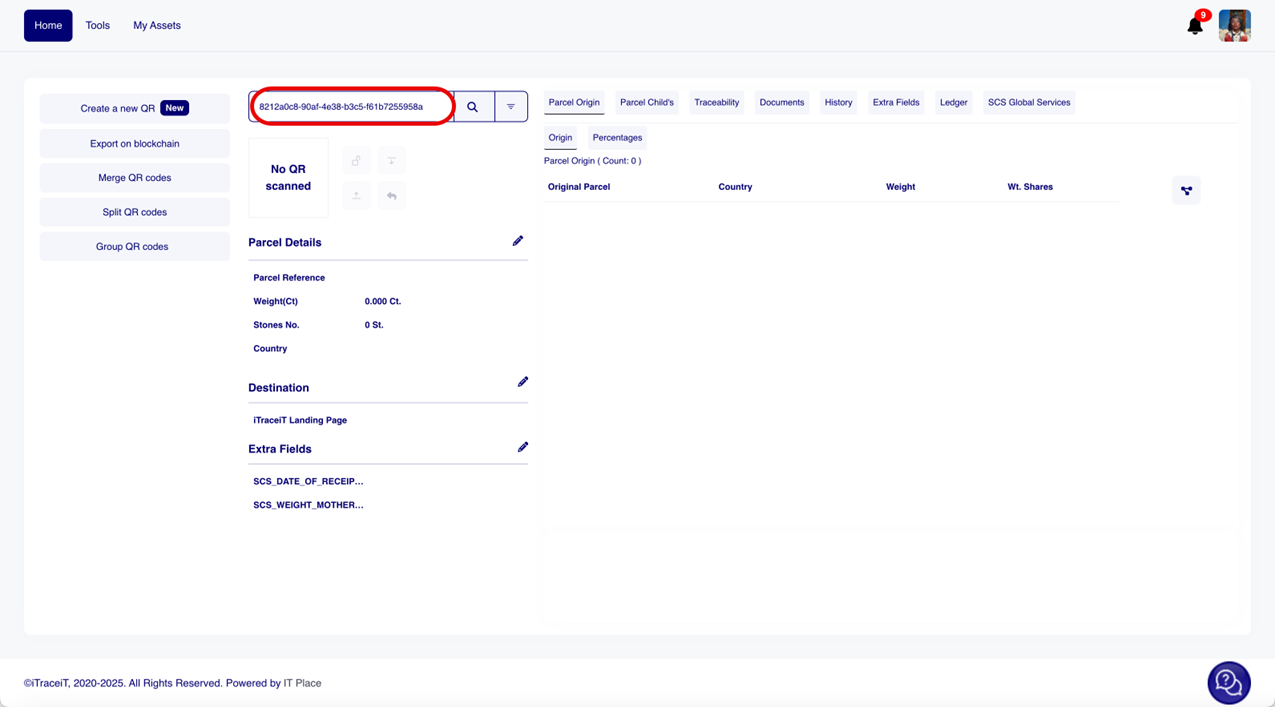
Scan the supplier’s QR code directly from your iTraceiT account.
-
A pop-up will appear asking if you want to import the data.
-
Verify all information carefully, origin, weight, and transfer details.
-
If everything is correct, click “Proceed” to import the upstream traceability.
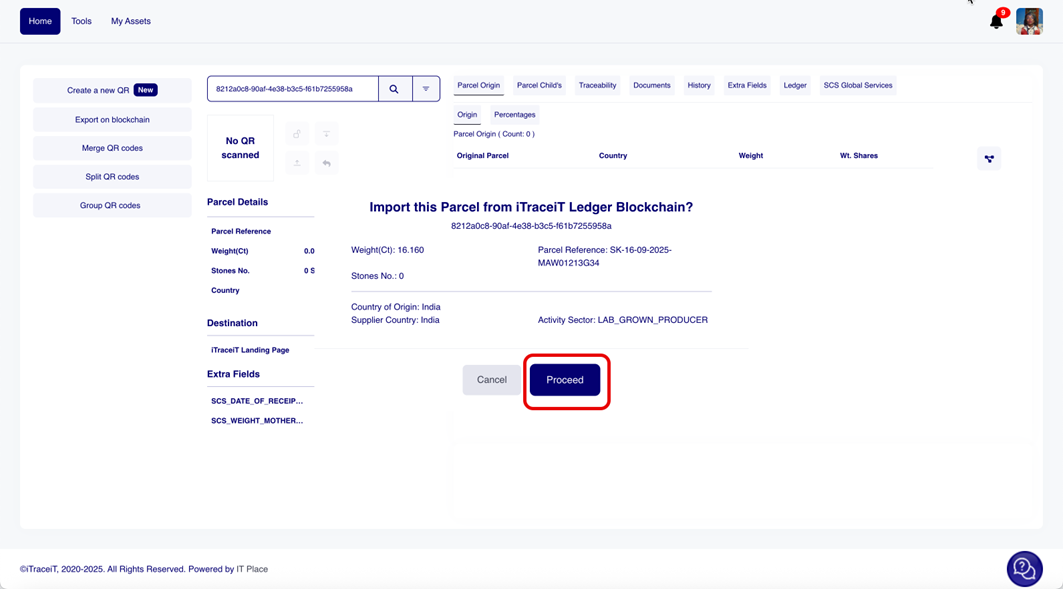
This action links the previous supply chain data to your record, allowing you to continue the product journey transparently.
Scenario 2: Your Supplier Does Not Use iTraceiT
If your supplier is not using the platform, iTraceiT allows you to manually include upstream details at the point where your traceability begins.
What You Can Do
-
When creating your QR code, enter all known origin details as extra fields (e.g., supplier name, region of origin, mine information, certificates).
-
While these details will not appear in the interactive journey, they will be visible on the QR code landing page, offering added transparency to your customer.
This ensures that even without a digital transfer from your supplier, you can still document responsible sourcing.
Why This Information May Not Appear in the Full Traceability Journey
Even when upstream data is added, you might notice that it doesn’t appear in the traceability PDF report. This is due to how iTraceiT handles traceability logic, which is based on location and segmentation.
According to our guidelines, the system only maps connections between actors if:
-
The location changes (e.g., from Angola to Belgium), and
-
There is a confirmed supply chain relationship via platform actions like QR import.
If the upstream data is manually entered or the supplier isn’t on the platform, it won't generate a linked segment in the traceability map. This is a designed safeguard to preserve data integrity and prevent assumptions about unverified chains.
Jewelers can include upstream information in iTraceiT in two ways: by scanning and importing a supplier’s QR code when they are a platform member, or by encoding verified details manually when they are not. While not all upstream data can be visually mapped in the journey view, both methods offer valuable transparency to your clients. With iTraceiT, you maintain control over your traceability narrative while respecting system integrity and supply chain logic.