---
title: SCS Jewelers – How to Export QR Codes on the Blockchain
description: "Exporting QR Codes on the blockchain ensures that your jewelry data is securely published and remains transparent, verifiable, and compliant with SCS certification standards.\n\nFor Jewelers, this step finalizes your traceability process and confirms that your certified pieces are ready to move forward in the supply chain with full credibility.\n\nBy exporting your QR Codes, you strengthen trust, reinforce transparency, and demonstrate your commitment to ethical and responsible craftsmanship."
---
[Skip to content](https://support.itraceit.io/en/scs-jewelers-how-to-export-qr-codes-on-the-blockchain#main-content)
English
Show submenu for translations
[](https://itraceit.io/?hsLang=en)
Open main navigation
Close main navigation
- English
Show submenu for translations
- [Log to my account](https://europe-workflow.itraceit.io/)
[Log to my account](https://europe-workflow.itraceit.io/)
How can we help you?
- There are no suggestions because the search field is empty.
1. [iTraceiT](https://support.itraceit.io/en?hsLang=en)
2. [Sectors & Actors](https://support.itraceit.io/en/sectors-actors?hsLang=en)
3. [SCS Global Services](https://support.itraceit.io/en/sectors-actors?hsLang=en#scs-global-services)
# SCS Jewelers – How to Export QR Codes on the Blockchain
In the SCS certification process, exporting QR codes on the blockchain is the final step that makes your jewelry data official, secure, and visible to the next certified actor in the supply chain.
For jewelers, this action confirms that the jewelry creation stage is complete and that all related information such as materials, certification data, and provenance details is ready to be permanently published.
When you export on the blockchain, iTraceiT records the verified information in a tamper-proof environment. This ensures that your certified jewelry remains transparent, traceable, and compliant with SCS standards for responsible sourcing.
In iTraceiT, you can export QR codes in two ways, either manually or in bulk.
This article explains both methods step by step.
### Manual Export – One Parcel at a Time
### **Watch the tutorial**
Learn how to export your QR Codes on the blockchain **manually** step by step in this short video demonstration.
Now that you have seen the full process, let’s go through each step in detail.
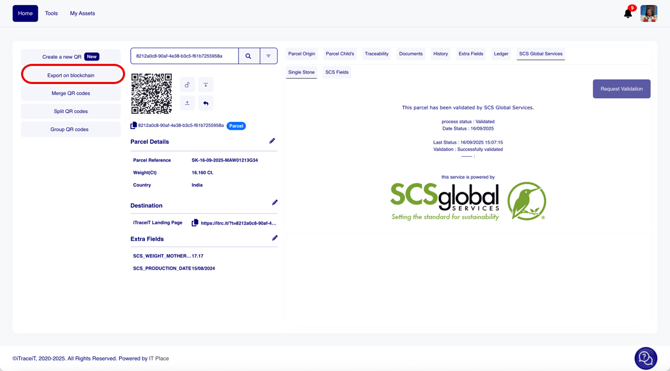
- **Step 1:** On the homepage, click on the button “**Export on Blockchain”**.
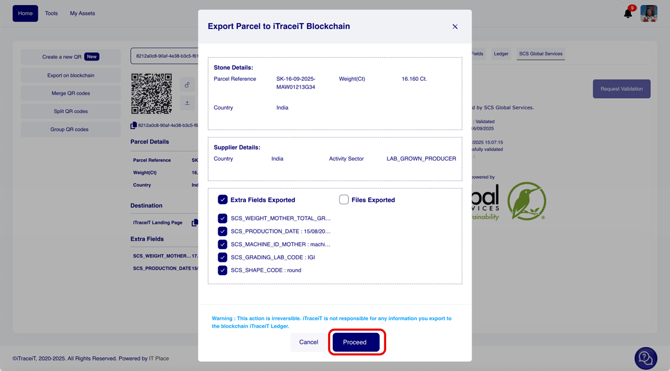
- **Step 2:** A pop-up window will appear showing a preview of all the information that will be published on the blockchain. **Carefully check that all information is correct** and press the button “**Proceed”.**
****
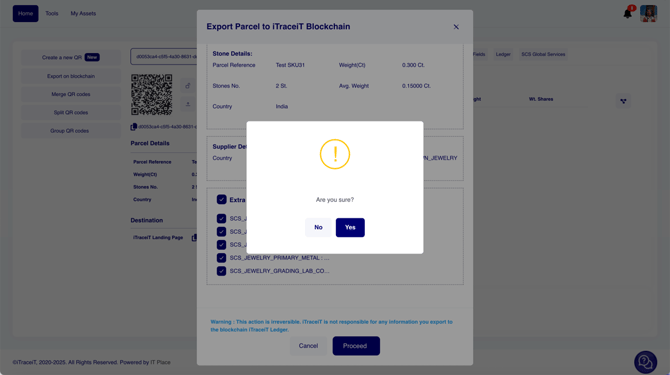
- **Step 3:** Click on “**Yes”** and the QR code will be exported.
### Bulk Export – Multiple Jewelry Pieces/Parcel at Once
### **Watch the tutorial**
Learn how to export your QR Codes on the blockchain **in Bulk,** step by step in this short video demonstration.
Now that you have seen the full process, let’s go through each step in detail.
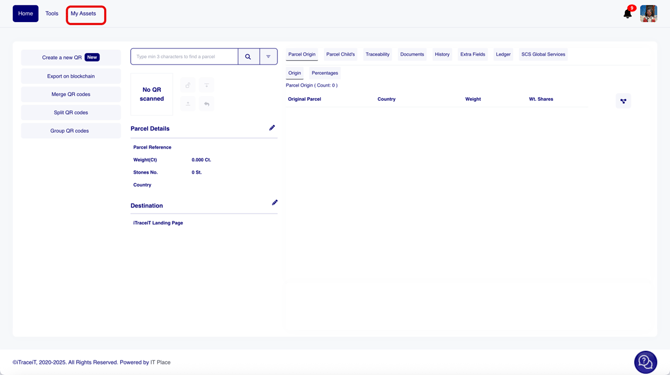
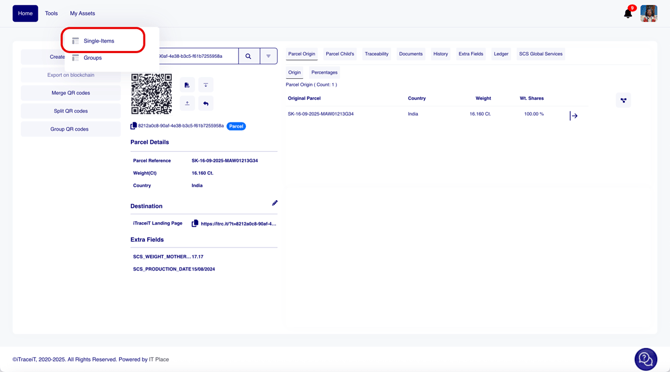
- **Step 1:** Click on “**My Assets”**.
- **Step 2:** Click on “**Single Items”.**
****
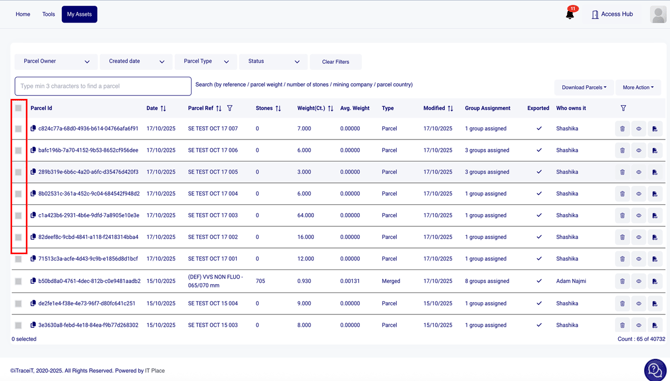
- **Step 3:** Select all the parcels that you want to export.
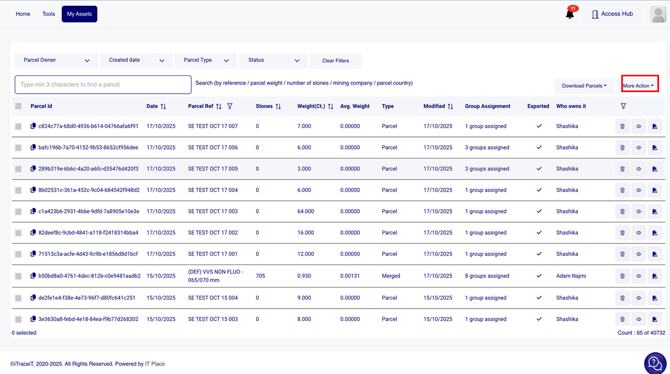
- **Step 4:** Click on **"More Action"**.
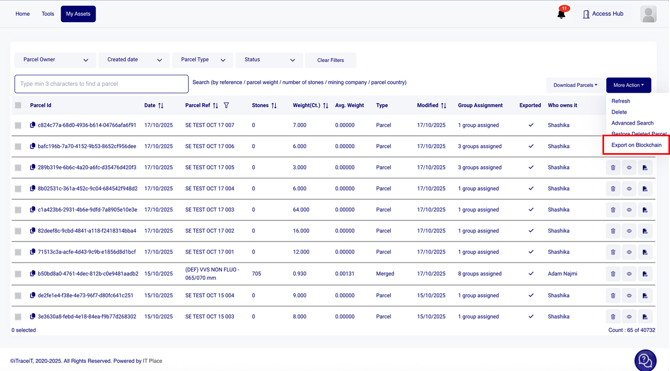
- **Step 5:** Click on **"Export on Blockchain".**
****
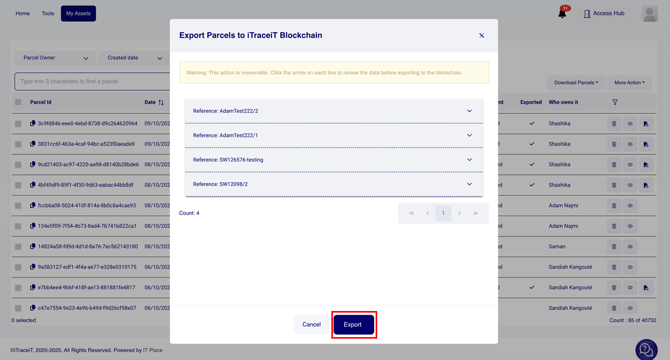
- **Step 6:** A pop-up window will appear showing a preview of all the selected parcels. **Carefully check that all information is correct and what Documents and Extra fields you would like to export for each parcel,** and press the button **“Export”.**
Exporting QR codes on the blockchain ensures that your jewelry data is securely published and remains transparent, verifiable, and compliant with SCS certification standards. For jewelers, this step finalizes your traceability process and confirms that your certified pieces are ready to move forward in the supply chain with full credibility. By exporting your QR codes, you strengthen trust, reinforce transparency, and demonstrate your commitment to ethical and responsible craftsmanship.
- [Getting Started](https://support.itraceit.io/en/getting-started?hsLang=en#main-content)
- [1. Introduction to iTraceiT](https://support.itraceit.io/en/getting-started?hsLang=en#1-introduction-to-itraceit)
- [2. Starting Point & Responsibility](https://support.itraceit.io/en/getting-started?hsLang=en#2-starting-point-responsibility)
- [3. Account Setup & Configuration](https://support.itraceit.io/en/getting-started?hsLang=en#3-account-setup-configuration)
- [4. Interface & Navigation](https://support.itraceit.io/en/getting-started?hsLang=en#4-interface-navigation)
- [Using iTraceiT](https://support.itraceit.io/en/using-itraceit?hsLang=en#main-content)
- [Step 1 : Create & Import QR Codes](https://support.itraceit.io/en/using-itraceit?hsLang=en#step-1-create-import-qr-codes)
- [Step 2: Add & Enrich Information](https://support.itraceit.io/en/using-itraceit?hsLang=en#step-2-add-enrich-information)
- [Step 3: Split, Merge & Group QR Codes](https://support.itraceit.io/en/using-itraceit?hsLang=en#step-3-split-merge-group-qr-codes)
- [Step 4: Publish & Share QR Codes](https://support.itraceit.io/en/using-itraceit?hsLang=en#step-4-publish-share-qr-codes)
- [Manage QR Code Lifecycle](https://support.itraceit.io/en/using-itraceit?hsLang=en#manage-qr-code-lifecycle)
- [Developer Documentation](https://support.itraceit.io/en/developer-documentation?hsLang=en)
- [Sectors & Actors](https://support.itraceit.io/en/sectors-actors?hsLang=en#main-content)
- [SCS Global Services](https://support.itraceit.io/en/sectors-actors?hsLang=en#scs-global-services)
- [Blockchain & Security](https://support.itraceit.io/en/blockchain-security?hsLang=en)
- [Data Privacy & Compliance](https://support.itraceit.io/en/data-privacy-compliance?hsLang=en)
- [Troubleshooting & FAQ](https://support.itraceit.io/en/troubleshooting-faq?hsLang=en)
- [Glossary](https://support.itraceit.io/en/glossary?hsLang=en)
[](https://itplace.com/en/)
Copyright © 2025, IT Place (TITP Srl)